
A couple of years ago, integrating an AI model with a company's own systems was craftwork: every connection (to the CRM, to the document store, to the internal API) had to be built from scratch, maintained separately, and duplicated every time you switched AI provider.
The Model Context Protocol (MCP) changes that equation. We promised earlier to come back to it, after looking at vector databases and embedding/reranking in the previous parts of this series, so here it is: what MCP is, why it matters to businesses, and how we have used it ourselves to make Danish company, address and financial-statement data available to AI agents, with concrete examples from five different industries.
What MCP is and why it exists
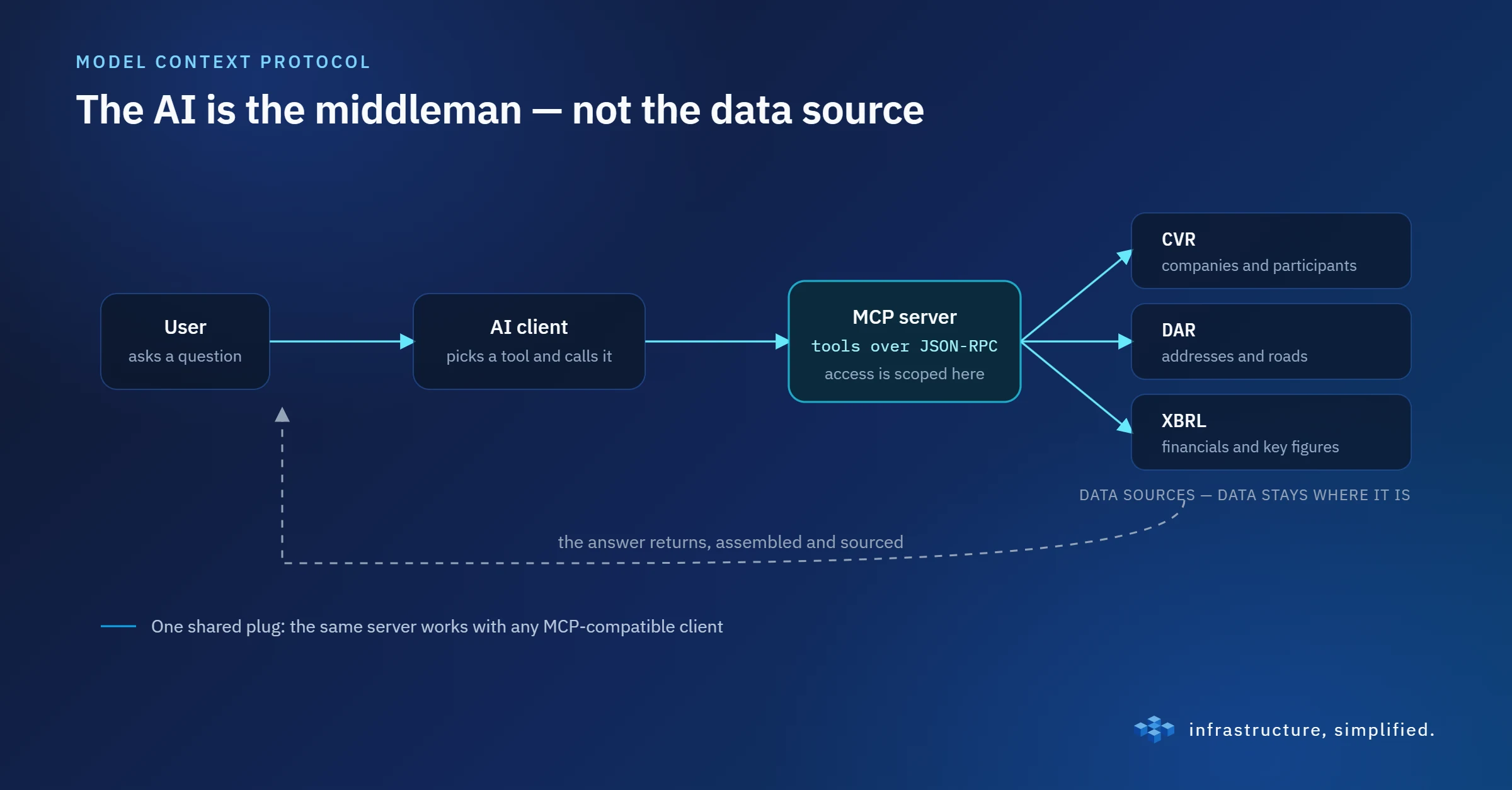
The Model Context Protocol was introduced in November 2024 as an open, standardised protocol for connecting AI models and AI agents to external data sources and tools. The idea is simple, but the effect is big: instead of every AI application building its own custom integration for every system, MCP provides one common "plug", much as USB-C made a separate cable for every device unnecessary.
Technically, MCP is built as a client-server architecture. An MCP server exposes a set of "tools" (functions the AI can call) and, in some cases, "resources" and "prompts". Communication runs over JSON-RPC, either locally over stdio or as a remote connection over SSE/HTTP when the server runs in the cloud. The client (the AI application itself) discovers dynamically which tools a given server offers and can call them as needed, without anyone having hardcoded the integration in advance.
Since the launch, the protocol has quickly gained broad support. Several major AI vendors have adopted it, and during 2025-26 an entire ecosystem of connectors and registries has grown up, where you can find and connect ready-made MCP servers for almost anything from project management to financial data.
What it means in practice for a business
The immediate gain is making knowledge available on demand. An employee does not need to know which system holds the answer, just ask, while the AI fetches the relevant information from the CRM, the ticketing system or the document store.
It goes further than lookups, though. Because MCP servers can expose actions, not just data, the AI can automate routine tasks: create a task, send a message, update a field, without the user having to switch between ten different tabs.
For companies that sit on data or an API of their own, MCP also opens a new distribution channel. Building your own MCP server means your data or functionality becomes "digestible" for any MCP-compatible client, without having to build and maintain a separate integration for each customer. And because access can be scoped and controlled at the server level, there is a built-in opportunity to think compliance in from the start, relevant for us, who work in and around the financial sector, where access control is not something you take lightly.
The business case is therefore not hard to spot: time savings, fewer errors in manual lookups, and faster onboarding, because new employees can ask the AI instead of having to learn five systems by heart.
Our case: property data from CVR, DAR and XBRL
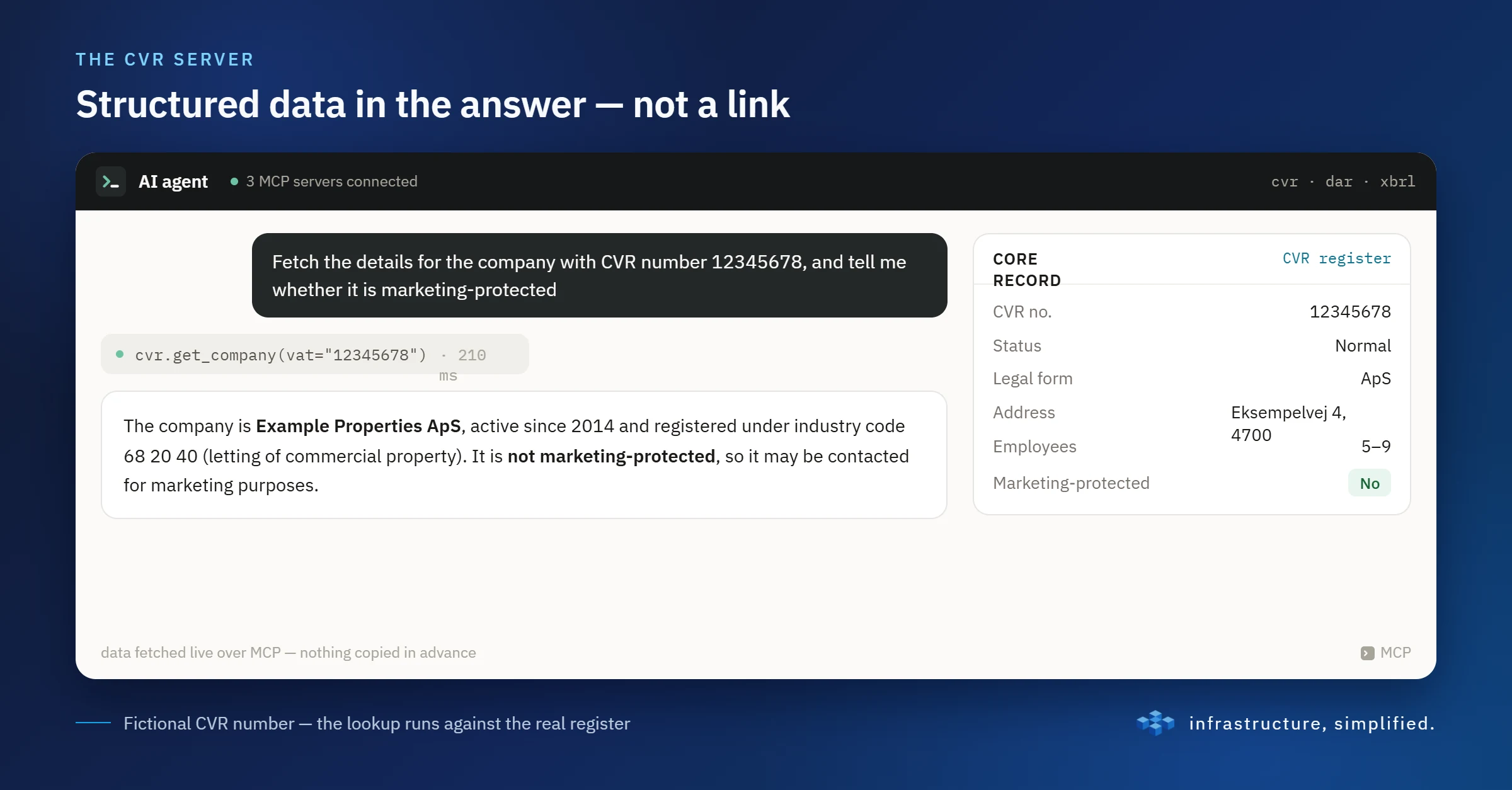
We have put this into practice with a concrete, public dataset: Danish company, address and financial-statement data. It is data that is freely available, but in practice fragmented and cumbersome to combine programmatically: the CVR register (the Danish Central Business Register), DAR (the Danish Address Register) and XBRL financial statements each live on their own, in their own format, with their own way in.
We have built three MCP servers, each covering its own corner. All three are free, public and protected with standard OAuth 2.0 (Bearer token, dynamic client registration, PKCE), so any MCP client can connect without a manual key exchange. Free quota: 500 calls/month, shared across all three servers (not 500 each).
<!DOCTYPE html>
<html lang="en">
<head>
<meta charset="utf-8">
<style>
:root { --ink:#0f172a; --sub:#475569; --line:#e2e8f0; --bg:#f8fafc; }
* { box-sizing: border-box; }
html { overflow: hidden; }
html, body { margin: 0; padding: 0; background: transparent; }
body {
font-family: -apple-system, BlinkMacSystemFont, "Segoe UI", Inter, Roboto, sans-serif;
color: var(--ink);
padding: 14px;
}
.card {
border: 1px solid var(--line);
border-radius: 12px;
overflow: hidden;
background: #fff;
}
.tabs {
display: flex;
background: var(--bg);
border-bottom: 1px solid var(--line);
}
.tab {
flex: 1;
padding: 12px;
text-align: center;
font-weight: 600;
font-size: 14px;
cursor: pointer;
color: var(--sub);
border-bottom: 3px solid transparent;
background: none;
border-left: none; border-right: none; border-top: none;
transition: color .15s, border-color .15s, background .15s;
font-family: inherit;
}
.tab:hover { color: var(--ink); }
.tab[data-active="true"] { background: #fff; }
.tab[data-svc="cvr"][data-active="true"] { color: #0369a1; border-color: #0ea5e9; }
.tab[data-svc="dar"][data-active="true"] { color: #0f766e; border-color: #14b8a6; }
.tab[data-svc="xbrl"][data-active="true"] { color: #4338ca; border-color: #6366f1; }
.panel { display: none; padding: 16px 18px; }
.panel[data-active="true"] { display: block; }
.badge {
display: inline-flex; align-items: center; gap: 6px;
font-size: 11px; font-weight: 700; letter-spacing: .03em; text-transform: uppercase;
padding: 3px 9px; border-radius: 999px; color: #fff; margin-bottom: 8px;
}
.panel[data-svc="cvr"] .badge { background: #0ea5e9; }
.panel[data-svc="dar"] .badge { background: #14b8a6; }
.panel[data-svc="xbrl"] .badge { background: #6366f1; }
h3 { margin: 0 0 6px; font-size: 17px; }
/* Fixed height (not min-height -- with a fixed value the tallest description, XBRL's,
sets the ceiling for all three so switching tabs never reflows the endpoint/row below it). */
p.desc { margin: 0 0 10px; color: var(--sub); font-size: 14px; line-height: 1.5; height: 42px; overflow: hidden; }
.endpoint {
display: flex; align-items: center; justify-content: space-between; gap: 8px;
font-family: ui-monospace, SFMono-Regular, Menlo, Consolas, monospace;
font-size: 13px;
background: var(--bg);
border: 1px solid var(--line);
border-radius: 8px;
padding: 8px 12px;
color: #1e293b;
word-break: break-all;
margin-bottom: 10px;
}
.endpoint code { font: inherit; min-width: 0; overflow-wrap: anywhere; }
.copy {
flex: none; display: inline-flex; align-items: center; gap: 5px;
height: 24px; padding: 0 8px; margin: -2px -6px -2px 0;
font: 600 12px/1 inherit; font-family: inherit; color: var(--sub);
background: #fff; border: 1px solid var(--line); border-radius: 6px; cursor: pointer;
transition: color .15s, border-color .15s, background .15s;
}
.copy:hover { color: var(--ink); border-color: #cbd5e1; }
.copy:focus-visible { outline: 2px solid #6366f1; outline-offset: 1px; }
.copy svg { width: 14px; height: 14px; }
.copy[data-done="true"] { color: #047857; border-color: #6ee7b7; background: #ecfdf5; }
.copy .ok { display: none; }
.copy[data-done="true"] .ok { display: inline; }
.copy[data-done="true"] .cp { display: none; }
.row { display: flex; gap: 10px; align-items: center; flex-wrap: wrap; }
.quota {
font-size: 12px; color: var(--sub); background: var(--bg);
border: 1px solid var(--line); border-radius: 999px; padding: 5px 11px;
}
a.docs {
font-size: 13px; font-weight: 600; text-decoration: none;
padding: 7px 13px; border-radius: 8px; color: #fff;
}
.panel[data-svc="cvr"] a.docs { background: #0ea5e9; }
.panel[data-svc="dar"] a.docs { background: #14b8a6; }
.panel[data-svc="xbrl"] a.docs { background: #6366f1; }
a.docs:hover { filter: brightness(0.93); }
</style>
</head>
<body>
<div class="card">
<div class="tabs" role="tablist">
<button class="tab" data-svc="cvr" data-active="true">CVR</button>
<button class="tab" data-svc="dar">DAR</button>
<button class="tab" data-svc="xbrl">XBRL</button>
</div>
<div class="panel" data-svc="cvr" data-active="true">
<span class="badge">MCP server</span>
<h3>CVR: company data</h3>
<p class="desc">Handles lookups and searches for Danish companies, by name, city, address or coordinate, plus lookups of participants and owners.</p>
<div class="endpoint"><code>https://cvr.mcp.liviate.com/mcp</code><button class="copy" type="button" data-copy="https://cvr.mcp.liviate.com/mcp" aria-label="Copy URL"><svg class="cp" viewBox="0 0 24 24" fill="none" stroke="currentColor" stroke-width="2" stroke-linecap="round" stroke-linejoin="round" aria-hidden="true"><rect x="9" y="9" width="12" height="12" rx="2"/><path d="M5 15V5a2 2 0 0 1 2-2h10"/></svg><svg class="ok" viewBox="0 0 24 24" fill="none" stroke="currentColor" stroke-width="2.5" stroke-linecap="round" stroke-linejoin="round" aria-hidden="true"><path d="M5 12.5l4.5 4.5L19 7"/></svg><span class="lbl">Copy</span></button></div>
<div class="row">
<span class="quota">Free quota: 500 calls/month (shared across all three servers)</span>
<a class="docs" href="https://liviate.com/docs/cvr-dar-xbrl-mcp" rel="noopener" data-open-new>Setup & auth guide →</a>
</div>
</div>
<div class="panel" data-svc="dar">
<span class="badge">MCP server</span>
<h3>DAR: address data</h3>
<p class="desc">Provides access to the Danish Address Register, with both free-text search and street-based search.</p>
<div class="endpoint"><code>https://dar.mcp.liviate.com/mcp</code><button class="copy" type="button" data-copy="https://dar.mcp.liviate.com/mcp" aria-label="Copy URL"><svg class="cp" viewBox="0 0 24 24" fill="none" stroke="currentColor" stroke-width="2" stroke-linecap="round" stroke-linejoin="round" aria-hidden="true"><rect x="9" y="9" width="12" height="12" rx="2"/><path d="M5 15V5a2 2 0 0 1 2-2h10"/></svg><svg class="ok" viewBox="0 0 24 24" fill="none" stroke="currentColor" stroke-width="2.5" stroke-linecap="round" stroke-linejoin="round" aria-hidden="true"><path d="M5 12.5l4.5 4.5L19 7"/></svg><span class="lbl">Copy</span></button></div>
<div class="row">
<span class="quota">Free quota: 500 calls/month (shared across all three servers)</span>
<a class="docs" href="https://liviate.com/docs/cvr-dar-xbrl-mcp" rel="noopener" data-open-new>Setup & auth guide →</a>
</div>
</div>
<div class="panel" data-svc="xbrl">
<span class="badge">MCP server</span>
<h3>XBRL: financial statements</h3>
<p class="desc">Makes financial data and key figures available across annual reports, for single companies and in batch, with partial element matching.</p>
<div class="endpoint"><code>https://xbrl.mcp.liviate.com/mcp</code><button class="copy" type="button" data-copy="https://xbrl.mcp.liviate.com/mcp" aria-label="Copy URL"><svg class="cp" viewBox="0 0 24 24" fill="none" stroke="currentColor" stroke-width="2" stroke-linecap="round" stroke-linejoin="round" aria-hidden="true"><rect x="9" y="9" width="12" height="12" rx="2"/><path d="M5 15V5a2 2 0 0 1 2-2h10"/></svg><svg class="ok" viewBox="0 0 24 24" fill="none" stroke="currentColor" stroke-width="2.5" stroke-linecap="round" stroke-linejoin="round" aria-hidden="true"><path d="M5 12.5l4.5 4.5L19 7"/></svg><span class="lbl">Copy</span></button></div>
<div class="row">
<span class="quota">Free quota: 500 calls/month (shared across all three servers)</span>
<a class="docs" href="https://liviate.com/docs/cvr-dar-xbrl-mcp" rel="noopener" data-open-new>Setup & auth guide →</a>
</div>
</div>
</div>
<script>
var tabs = document.querySelectorAll('.tab');
var panels = document.querySelectorAll('.panel');
tabs.forEach(function (tab) {
tab.addEventListener('click', function () {
var svc = tab.getAttribute('data-svc');
tabs.forEach(function (t) { t.removeAttribute('data-active'); });
panels.forEach(function (p) { p.removeAttribute('data-active'); });
tab.setAttribute('data-active', 'true');
document.querySelector('.panel[data-svc="' + svc + '"]').setAttribute('data-active', 'true');
});
});
// A plain <a target="_blank"> inside a sandboxed srcdoc iframe (allow-popups, no
// allow-top-navigation) opened TWO tabs in Chromium -- the real target AND a spurious
// duplicate of this card's own document -- confirmed live 2026-09-20. Explicit window.open()
// on click, instead of relying on the browser's native target="_blank" handling, doesn't
// trigger it.
document.querySelectorAll('a[data-open-new]').forEach(function (a) {
a.addEventListener('click', function (e) {
e.preventDefault();
window.open(a.getAttribute('href'), '_blank', 'noopener');
});
});
function fallbackCopy(text) {
var ta = document.createElement('textarea');
ta.value = text; ta.setAttribute('readonly', '');
ta.style.cssText = 'position:fixed;top:0;left:0;opacity:0';
document.body.appendChild(ta); ta.select();
var ok = false; try { ok = document.execCommand('copy'); } catch (e) {}
document.body.removeChild(ta); return ok;
}
document.querySelectorAll('.copy').forEach(function (btn) {
btn.addEventListener('click', function () {
var text = btn.getAttribute('data-copy');
var done = function (ok) {
if (!ok) return;
btn.setAttribute('data-done', 'true'); btn.querySelector('.lbl').textContent = 'Copied';
setTimeout(function () { btn.removeAttribute('data-done'); btn.querySelector('.lbl').textContent = 'Copy'; }, 1800);
};
if (navigator.clipboard && navigator.clipboard.writeText) {
navigator.clipboard.writeText(text).then(function () { done(true); }, function () { done(fallbackCopy(text)); });
} else { done(fallbackCopy(text)); }
});
});
</script>
</body>
</html>The full setup and authentication guide (including how to add them in Claude Desktop or another MCP client) is on the docs page for the three servers.
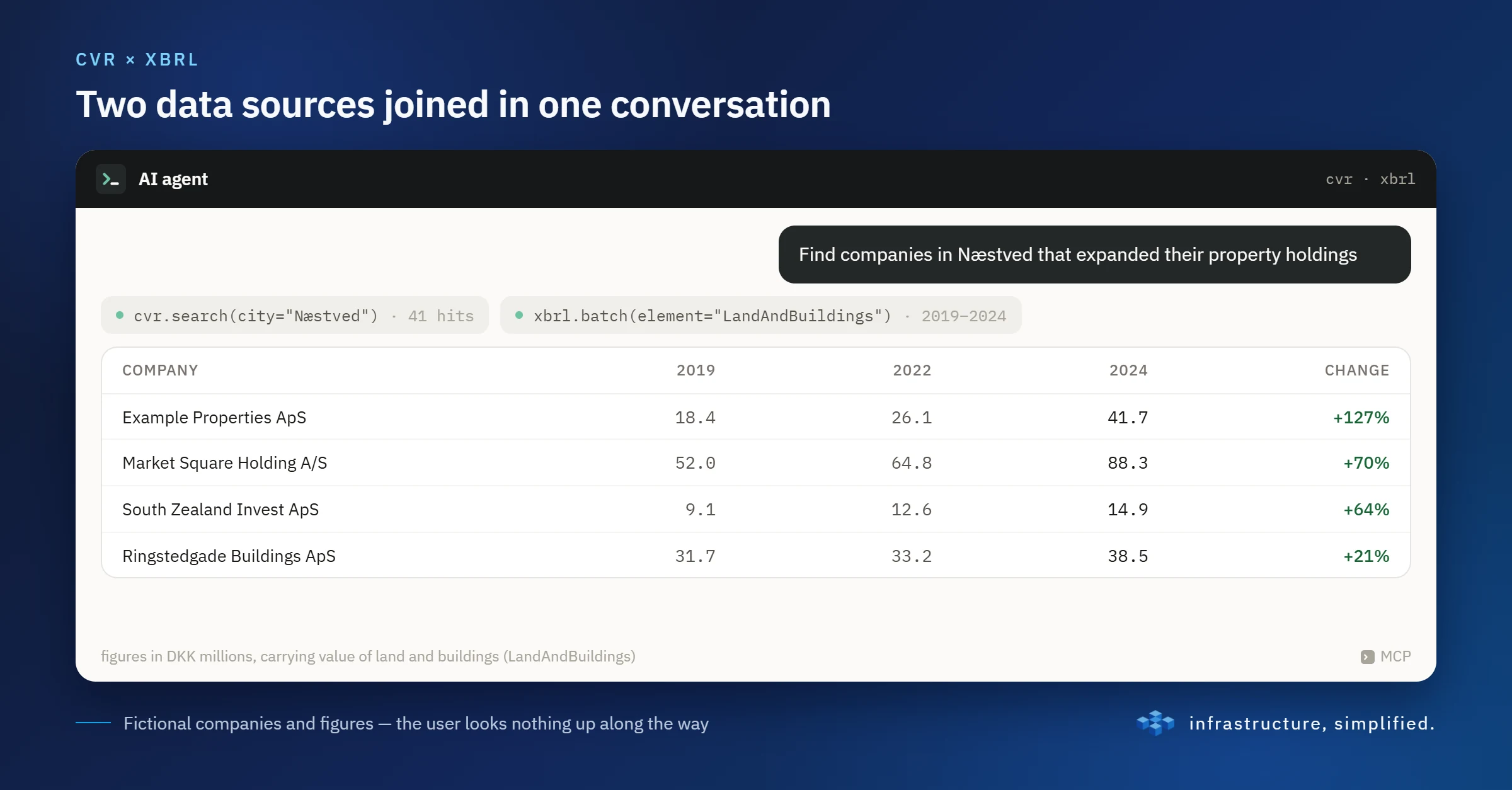
The interesting part happens when you combine them. Finding companies in a given city with growing property holdings requires crossing CVR data (who exists, and where) with XBRL data (how has their booked property value, e.g. "LandAndBuildings", developed over several years). With the MCP servers this happens as one coherent conversation with an AI agent, instead of hours of manually going through financial statements.
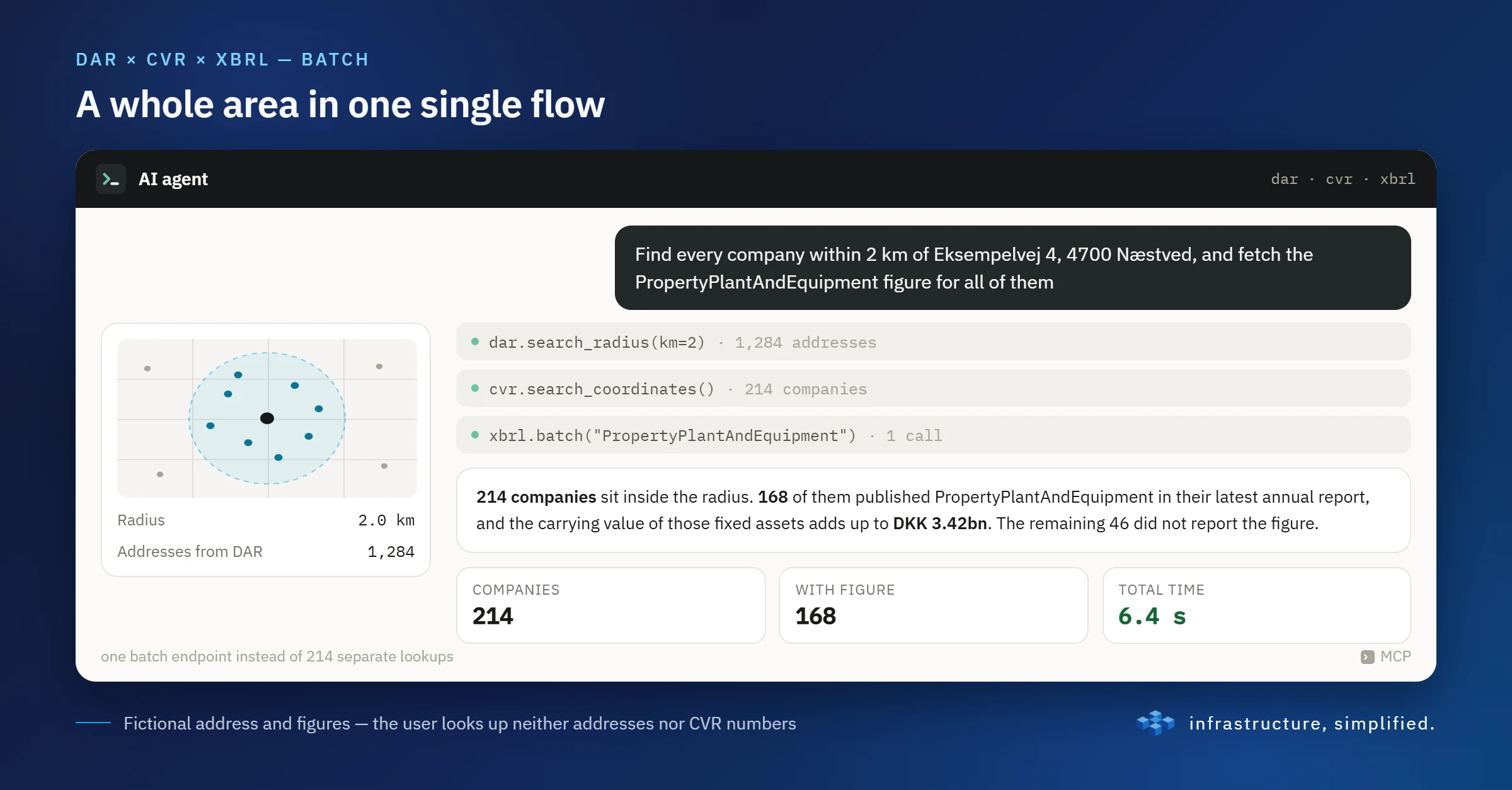
A few practical details make a real difference to performance and usability: batch endpoints that avoid repeated single lookups when you need to check hundreds of companies at once; partial element matching in XBRL data, so you can search broadly on e.g. "PropertyPlantAndEquipment" without knowing the exact key-figure name; and an honest acknowledgement of the limitations you run into in practice, e.g. pagination and a cap on the number of search results. Details like these are not just technical footnotes: they are often the difference between a tool that works in theory and one that works in production.
Who can use it: five industries, five examples
Data on companies, addresses and financial statements is interesting far beyond our own field. Here is a suggestion for how five different professions could use the same foundation.
Real estate agents
- Monitor ownership changes on properties in a given postcode
- Price commercial property based on the booked property values of comparable companies
- Identify portfolio owners as potential sellers or buyers
- Automatically enrich their own listings with addresses via DAR
Credit assessment
- Automatic key-figure "health check" before granting credit, pulled directly from XBRL instead of reading PDFs manually
- Flag companies with falling equity or rising gearing relative to their property holdings
- Compare an applicant's key figures against industry averages
- Continuously monitor an entire customer portfolio as new annual reports are published
Due diligence
- Quick overview of a target company's group structure via participant lookups
- Discrepancy check between public financial figures and what the target company has presented itself
- Historical review of a company's asset development over ten years in minutes
- Screening an entire industry cluster for red flags
Sales and lead generation
- Lead lists based on criteria such as equity, revenue growth and geography
- Trigger-based outreach, e.g. when a company has just bought a property
- Enrich existing CRM data with fresh CVR and financial figures
- Segment by advertising protection, so you only contact those who may actually be contacted
Journalists
- Trace ownership networks across companies
- Build stories on actual financial figures
- Verify a company's own growth claims against the actual numbers
- Quick background check on a company mentioned in a tip
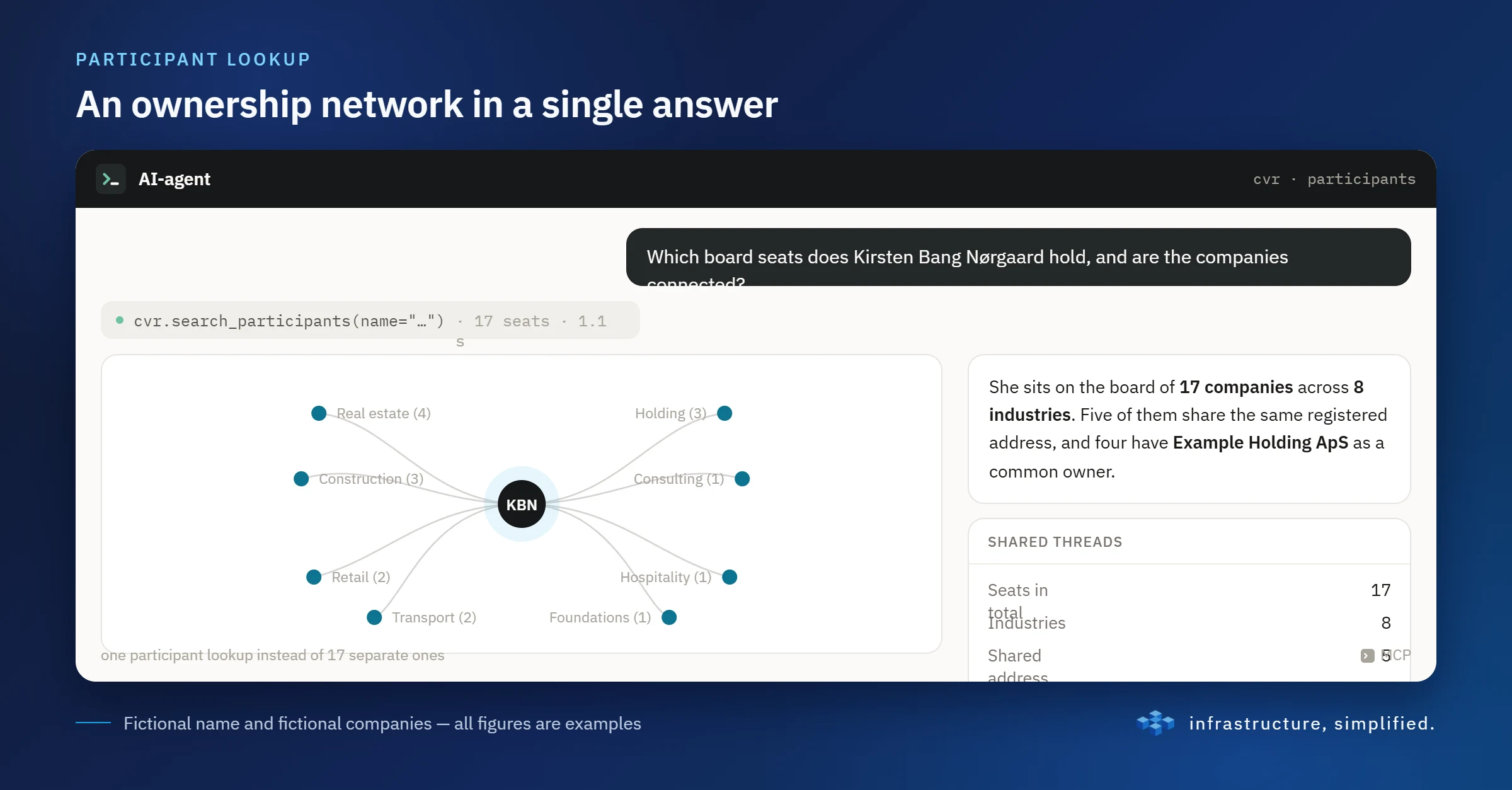
Not for mapping nation states
MCP moves the boundary of what an AI agent can contribute, from answering questions based on what it already knows to fetching, crossing and acting on current data itself. For us this has concretely meant that Danish CVR, address and financial-statement data has gone from being three separate, cumbersome data sources to one coherent foundation that an AI agent can navigate on its own.
And let's be honest: when you have three or four MCP servers that can instantly cross companies, addresses, financial statements and ownership networks across twenty companies, it is hard not to get that Palantir feeling: a flowchart wall full of red string and a few self-assured PowerPoints about "Foundry for the Danish Mittelstand". The good news is that this will mostly be used to work out whether an estate agent should call the right portfolio owners, or whether an auditor can save an afternoon of PDF hunting, not to map nation states. But should anyone feel like building an intelligence platform for advertising-protected holding companies, the building blocks are at least ready. We take no responsibility for conspiracy theories that arise along the way.
Is this relevant to you?
Are you building something where you today cross-check public or internal data manually, across several sources? Get in touch and we will talk about where you could start.