RAG pipeline: getting started
Ingest, retrieval and generation with Liviate's RAG pipeline -- a quick start for the Python and .NET SDKs.
About the RAG pipeline
Liviate's RAG pipeline (ingest, embedding, retrieval, rerank and optional generation) is available through two official, open source SDKs with the same method surface:
Every code example below is given in both languages.
Installation
pip install liviate-ragdotnet add package Liviate.RagGet your API key
Both the Python and the .NET client need a Liviate API key — either passed directly to the client, or set as the LIVIATE_API_KEY environment variable. The key is created in the Liviate console:
Sign in to the console.
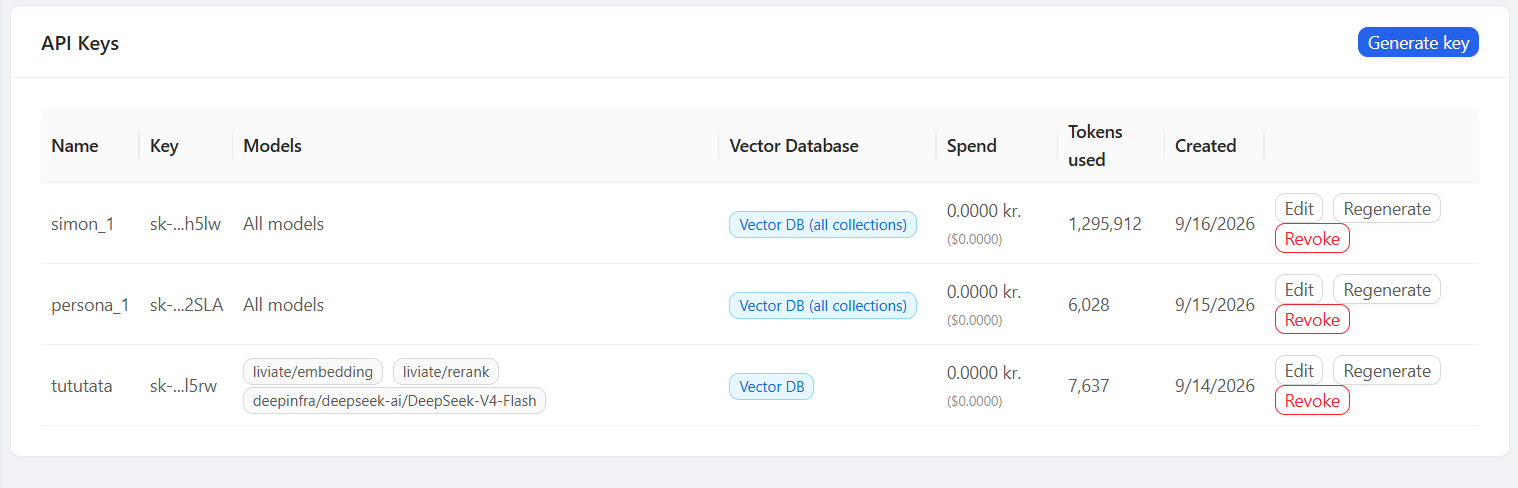
Go to Inference → API Keys.
Click Generate key and choose what the key should have access to:
- Which models it may call (for example
liviate/embeddingandliviate/rerankfor the RAG pipeline itself, plus a chat model if you usequery()/QueryAsync()for generation). Leave the list empty to allow every model. - Whether it has access to the Vector Database scope, and if so which collections (an empty list = all collections).
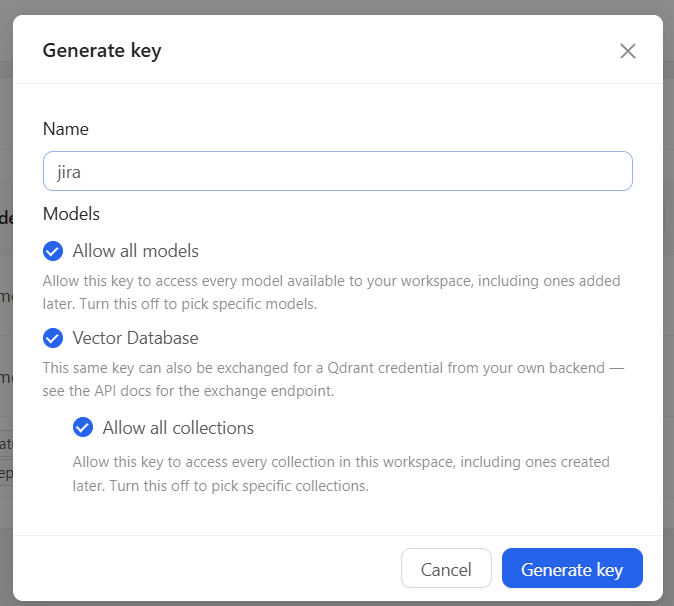
- Which models it may call (for example
Copy the key straight away — it is shown only once.

If you get an error saying the key may not call a particular model, the error message itself names exactly which models the key does have access to — fix the key's permissions in the console rather than guessing.
Quick start ("Hello World")
The smallest program that proves the installation and the API key work — no collection, no model name, nothing else to set up:
from liviate_rag import RAGClient

with RAGClient() as client:  # reads LIVIATE_API_KEY from the environment
    result = client.embed(["Hello, world!"])
    print(f"Embedded 1 text into a {len(result.vectors[0])}-dimensional vector.")
    print(f"Tokens used: {result.usage.tokens}")
using Liviate.Rag;
await using var client = new RagClient(); // reads LIVIATE_API_KEY from the environment
var result = await client.EmbedAsync(new[] { "Hello, world!" });
Console.WriteLine($"Embedded 1 text into a {result.Vectors[0].Count}-dimensional vector.");
Console.WriteLine($"Tokens used: {result.Usage.Tokens}");Full pipeline: ingest, retrieve and query
The next step: put content into a collection, fetch the most relevant context for a question, and let a model generate an answer from that context.
1. Ingest
ingest()/IngestAsync() takes a file, URL, text string or stream — and works out which it is from the content itself, never from the file extension. A collection is created automatically the first time you ingest into a name that does not exist yet; there is no separate "create the collection first" step.
from liviate_rag import RAGClient

COLLECTION = "hotel-kirstine"

with RAGClient() as client:
    result = client.ingest("handbook.pdf", collection=COLLECTION)
    print(f"{result.chunks_created} chunk(s) created")
using Liviate.Rag;
const string Collection = "hotel-kirstine";
await using var client = new RagClient();
var result = await client.IngestAsync("handbook.pdf", Collection);
Console.WriteLine($"{result.ChunksCreated} chunk(s) created");Supported file types: PDF (.pdf), Word (.docx), Markdown (.md), plain text (.txt), CSV (.csv), JSON (.json) and HTML (.html) — plus raw text and URLs (a single page is fetched/scraped automatically). OCR and scanned images are deliberately not supported in v1; such a call fails explicitly rather than half-parsing the content. Whole-site crawling is not part of the SDK either — crawl with your own tool and pass the resulting list of URLs to ingest()/IngestAsync(), which already accepts a whole batch in one call.
If you ingest with a non-default embed_model/embedModel, you must for now pass the same model explicitly again at retrieval/query time — the backend does not yet remember which model a collection was created with, and a query embedding from a different model than the collection's gives either noise or an outright dimension mismatch.
2. Ranked context only (no generation)
If you want to call your own LLM, you can fetch the ranked context alone, without Liviate generating an answer:
context = client.retrieve("Do you have parking?", collection=COLLECTION, top_k=5)
for source in context.sources:
    print(f"({source.score:.3f}) {source.text}")
var context = await client.RetrieveAsync("Do you have parking?", Collection, topK: 5);
foreach (var source in context.Sources)
{
Console.WriteLine($"({source.Score:F3}) {source.Text}");
}3. Query (retrieval + generation)
query()/QueryAsync() does both: fetches context and lets a model generate an answer from it. There is deliberately no default model here — you always name the model that should generate the answer:
result = client.query("Do you have parking?", collection=COLLECTION, model="anthropic/claude-sonnet-5")
print(result.answer)
print(result.sources)
print(result.usage)
print(result.timing)
var result = await client.QueryAsync("Do you have parking?", Collection, "anthropic/claude-sonnet-5");
Console.WriteLine(result.Answer);
Console.WriteLine(result.Usage);
Console.WriteLine(result.Timing);Streaming answers
For chat-like use, query()/QueryAsync() can stream the answer as it is generated, instead of waiting for the finished answer:
for chunk in client.query("Do you have parking?", collection=COLLECTION, model="anthropic/claude-sonnet-5", stream=True):
    print(chunk, end="", flush=True)
await foreach (var chunk in client.QueryStreamAsync("Do you have parking?", Collection, "anthropic/claude-sonnet-5"))
{
Console.Write(chunk);
}Remove content
Delete either by id (for example point_ids/PointIds from an earlier ingest call) or by a metadata filter — exactly one of the two must be given:
client.delete(COLLECTION, ids=result.point_ids)
client.delete(COLLECTION, filter={"must": [...]})
await client.DeleteAsync(Collection, ids: result.PointIds);
await client.DeleteAsync(Collection, filter: new { must = new object[] { /* ... */ } });Error handling
Both SDKs deliberately distinguish between two kinds of error:
- Errors in the call or the setup (a source
ingest()cannot classify,delete()called with both or neither ofids/filter) — raised as Python's built-inValueError, or an ordinaryArgumentExceptionin .NET, never as a Liviate-specific exception. These are errors in the calling code, not something a backend failure can cause. - Backend and operational errors (a bad response from the API, a timeout, an unsupported file type) — always raised as
LiviateError(Python) orLiviateException(.NET), or a subclass thereof, whichever transport failed:
| Python | .NET | Meaning |
|---|---|---|
LiviateError |
LiviateException |
Common base class — catch this to cover every backend/operational error at once. |
RateLimitError |
RateLimitException |
HTTP 429. |
APIError |
— | Any other non-2xx response (Python only; the .NET SDK groups these under LiviateException directly). |
UnsupportedFileType |
UnsupportedFileTypeException |
The file's content matches no supported type. |
IngestTimeout |
IngestTimeoutException |
ingest(..., wait=True)/IngestAsync() exceeded its timeout. Try again with wait=False/StartIngest() and wait for the job instead. |
ingest()/IngestAsync() on a batch of sources only fails outright if every item in the batch fails. If some but not all fail, the call still completes and the failing items appear in result.warnings.
Configuration
| Setting | Python (RAGClient(...)) |
.NET (RagClient(...)/RagClientOptions) |
Default |
|---|---|---|---|
| API key | api_key= (otherwise LIVIATE_API_KEY) |
apiKey: (otherwise LIVIATE_API_KEY) |
— (required) |
| Gateway URL | base_url= |
Options.BaseUrl |
https://liviate.com |
| Vector store endpoint | (set internally) | Options.ExchangeUrl |
https://console.liviate.com/api/tenancy/vectordb/exchange-token/ |
| Timeout | timeout= (per call) |
Options.Timeout |
60 sec. (the pipeline's overall ingest timeout is separate, see IngestTimeoutException above) |
If you point base_url/BaseUrl at an environment other than the default, the vector store endpoint does not follow automatically — the two live on separate hosts in production as well, so set them explicitly and separately if both need to change.